L2TP VPN IKEv1 Test
Test L2TP/IPsec VPN with pre-shared key
Connection Test Only
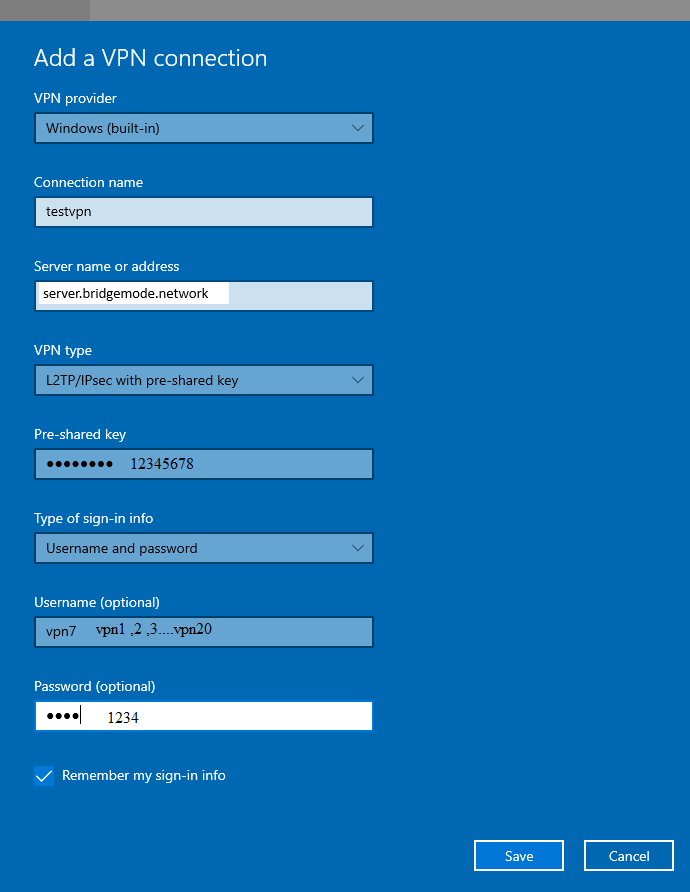
Server Address
server.bridgemode.network
VPN Type
L2TP/IPsec with pre-shared key
Pre-shared Key

Username (choose one)
vpn1, vpn2, vpn3, ... vpn20
Password

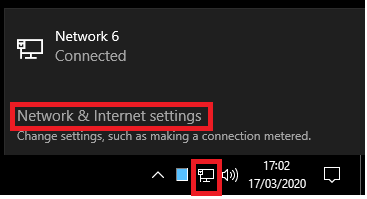
Open Network Settings
Click on the network icon in your system tray and select 'Network & Internet settings'
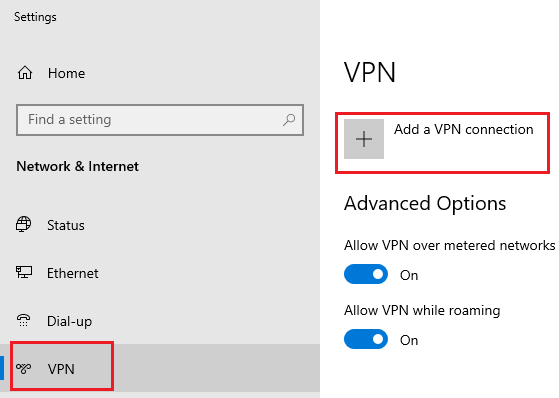
Navigate to VPN
In the Network & Internet settings, click on 'VPN' in the left sidebar
Add VPN Connection
Click 'Add a VPN connection' and fill in the configuration details shown above
Ready to Connect
Once configured, click the VPN connection to connect
We Value Your Privacy
This website uses cookies to improve your experience. Some cookies are essential for the site to function, while others help us understand how you use our website so we can improve it.
By clicking "Accept All", you consent to our use of cookies. You can customize your preferences or reject non-essential cookies. See our Cookie Policy for more details.