VPN IKEv2 Test
Test IKEv2/IPSec PSK connections
Connection Test Only
This VPN test has no internet access - it's for connection testing only. DNS is allowed via 192.168.138.2
VPN Configuration
Use these settings to configure your IKEv2 VPN connection
Server Address
server.bridgemode.network
VPN Type
IKEv2/IPSec PSK
Pre-shared Key

Username (choose one)
vpn1, vpn2, vpn3, ... vpn20
Password

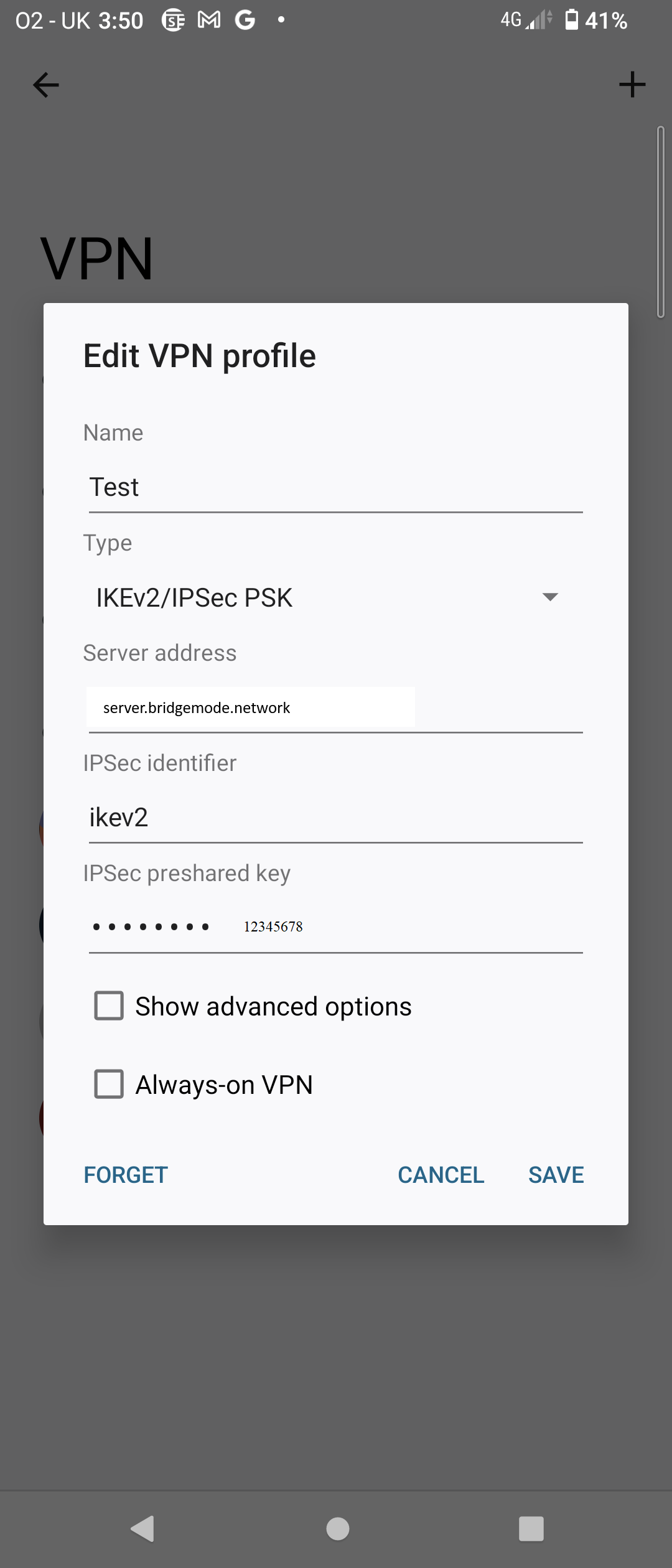
Android Setup Example
Follow these steps to configure VPN on Android devices
1
Go to Settings → Network & Internet → VPN
2
Tap the + button to add a new VPN profile
3
Select "IKEv2/IPSec PSK" as the VPN type
4
Enter the server address and credentials shown above
5
Save and connect to test the VPN
We Value Your Privacy
This website uses cookies to improve your experience. Some cookies are essential for the site to function, while others help us understand how you use our website so we can improve it.
By clicking "Accept All", you consent to our use of cookies. You can customize your preferences or reject non-essential cookies. See our Cookie Policy for more details.